SenseTime · Open-source · Apache 2.0

SenseNova U1.6 AI Image Generator

SenseNova U1.6 is SenseTime's open-source 8B image model for posters with exact English and Chinese text, film-like portraits, product photos and instruction-based edits. Every image on this page was generated by SenseNova U1.6 itself.

1

Seven SenseNova U1.6 images from our own test run, each shown with the exact prompt we used. Hover or tap to read the prompt, then send it to the generator.

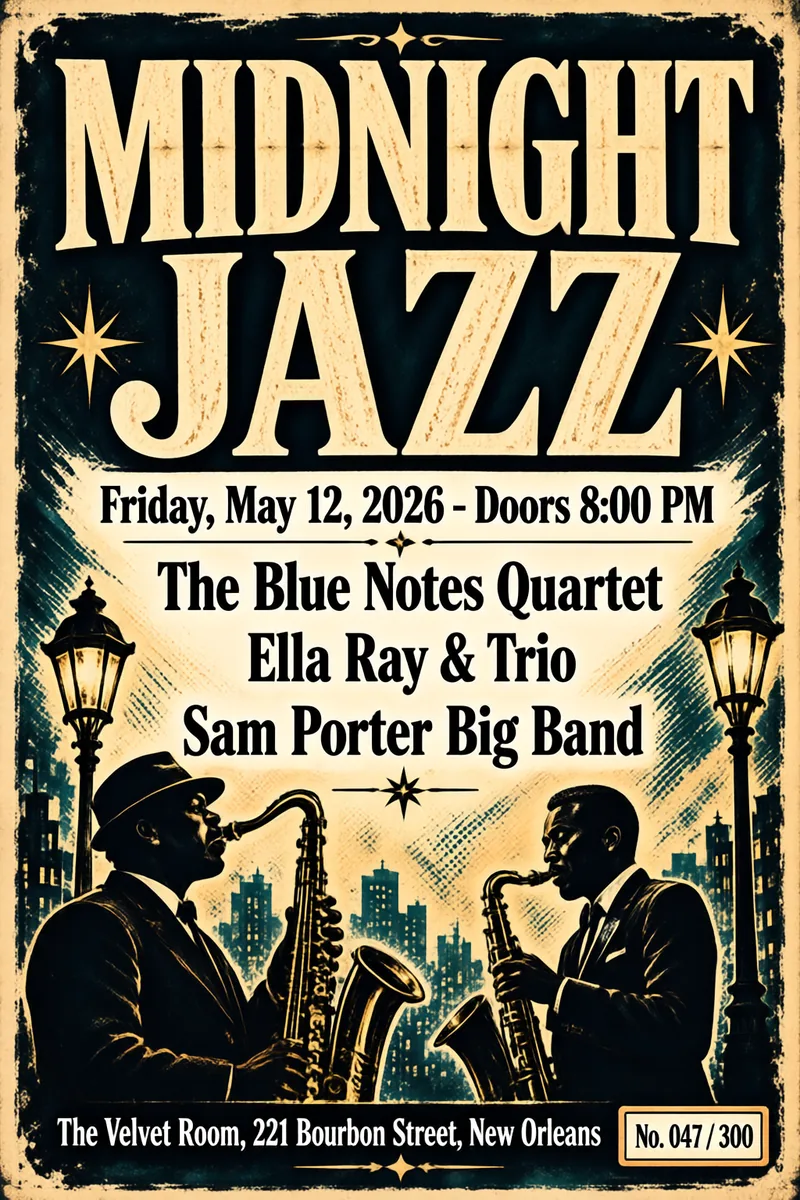
SenseNova U1.6: Screen-print concert poster

Vintage two-tone jazz concert poster, screen-print texture, cream and deep teal. Large title "MIDNIGHT JAZZ". Below it "Friday, May 12, 2026 - Doors 8:00 PM". Lineup in three lines: "The Blue Notes Quartet", "Ella Ray & Trio", "Sam Porter Big Band". A saxophone player silhouette illustration. Bottom text "The Velvet Room, 221 Bourbon Street, New Orleans" and a small stamp "No. 047 / 300".

Screen-print concert poster
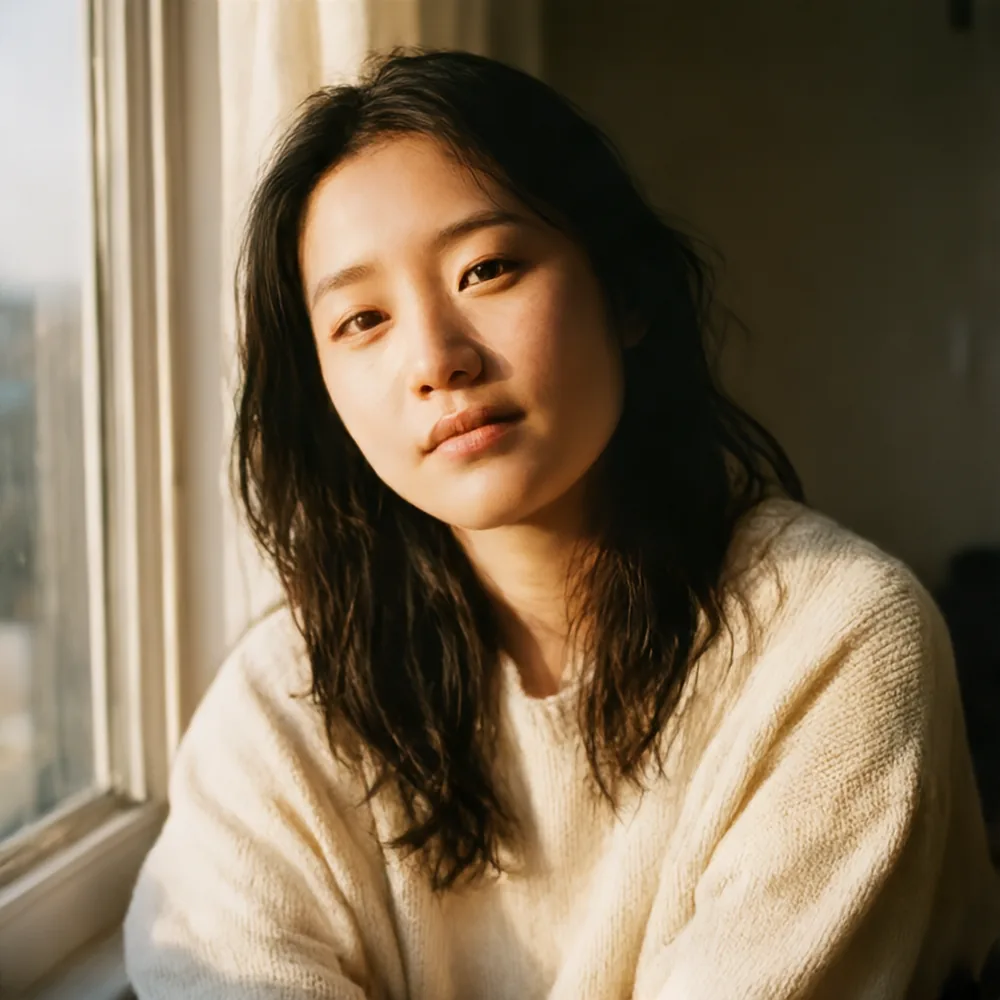
SenseNova U1.6: Kodak Portra film portrait

Portrait of a young East Asian woman sitting by a window at golden hour, shot on Kodak Portra 400 film, soft warm side light, visible film grain, shallow depth of field, natural skin texture with pores, loose cream knit sweater, candid relaxed expression, 85mm lens.

Kodak Portra film portrait
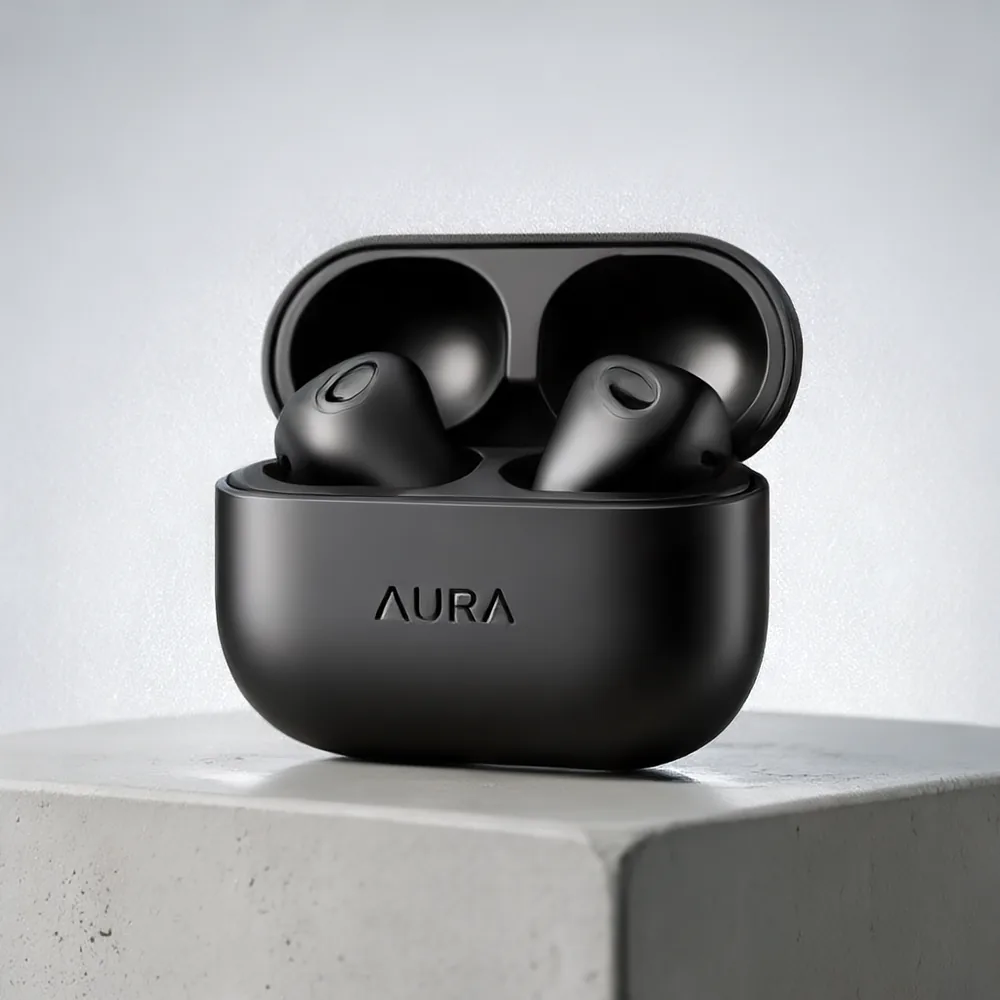
SenseNova U1.6: E-commerce product shot

Professional e-commerce product photo of a matte black wireless earbud charging case with the lid open and two earbuds visible, placed on a light grey concrete pedestal, soft studio lighting with subtle reflections, minimal clean background. The word "AURA" is engraved on the front of the case.

E-commerce product shot
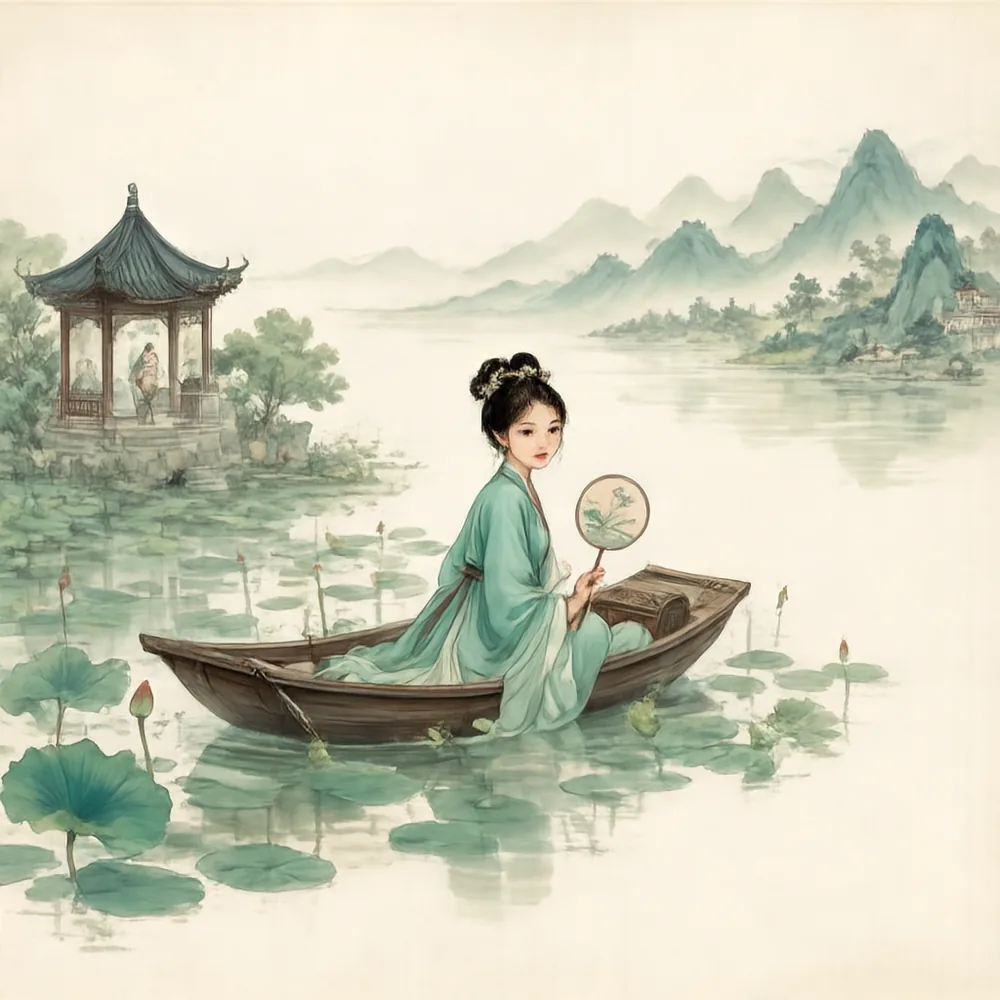
SenseNova U1.6: Chinese gongbi illustration

国风工笔插画:一位身穿青绿色汉服的少女坐在荷塘中的小舟上,手持团扇回眸,远处有亭台楼阁与层叠远山,淡雅的青绿山水配色,细腻的线描与晕染,宣纸纹理,留白构图。

Chinese gongbi illustration
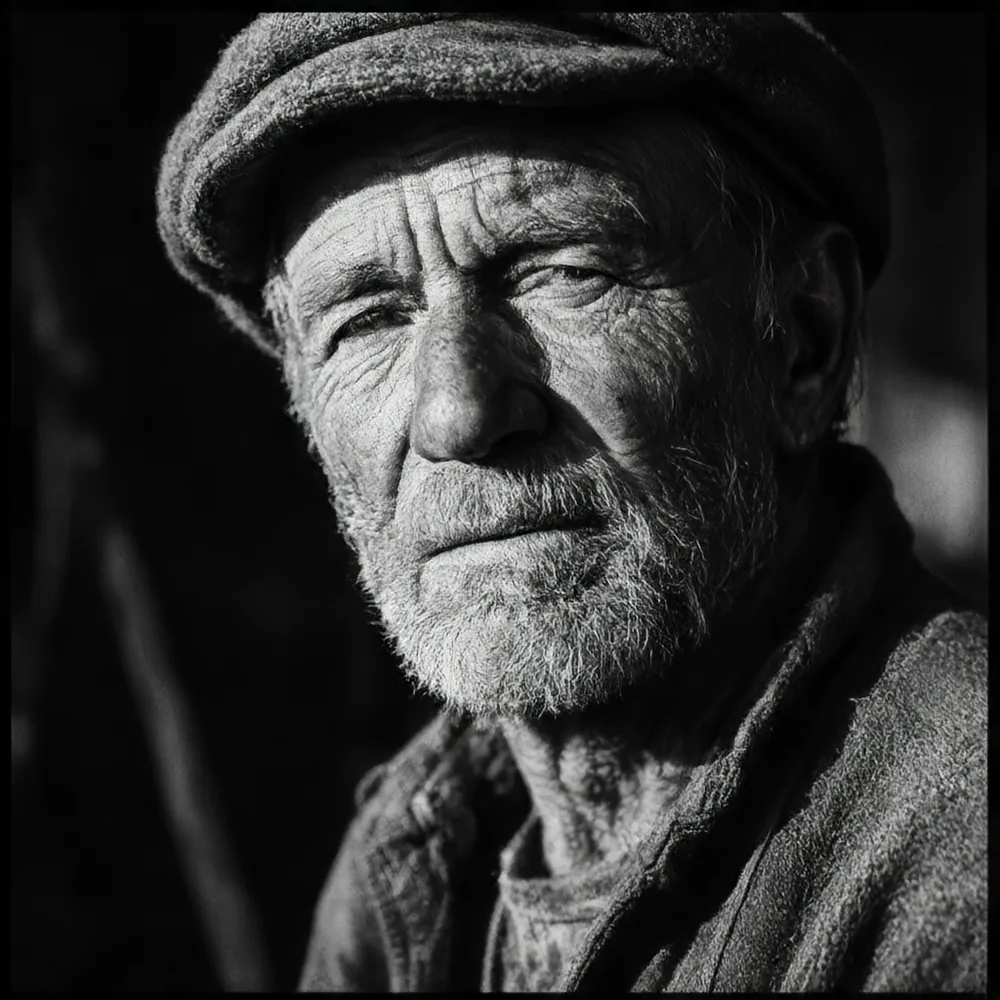
SenseNova U1.6: Black-and-white character study

Black-and-white close-up portrait of an elderly fisherman with deep wrinkles, grey stubble and a wool cap, hard directional light from the left, Rembrandt lighting, Ilford HP5 film grain, high contrast, sharp eyes, dark background.

Black-and-white character study
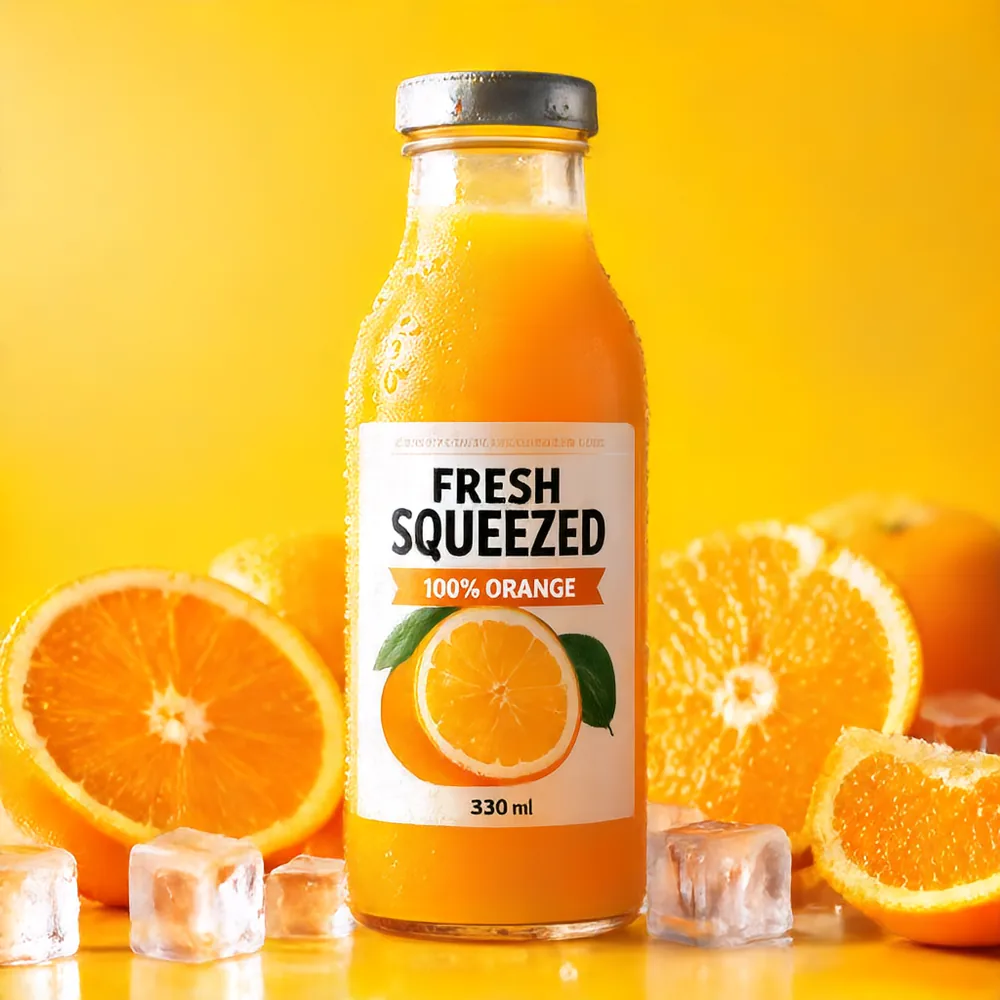
SenseNova U1.6: Product label with three lines

Commercial product shot of a glass bottle of cold-pressed orange juice with condensation droplets, the label reads "FRESH SQUEEZED", "100% ORANGE", "330 ml", surrounded by orange slices and ice cubes on a bright yellow background, high-key lighting.

Product label with three lines
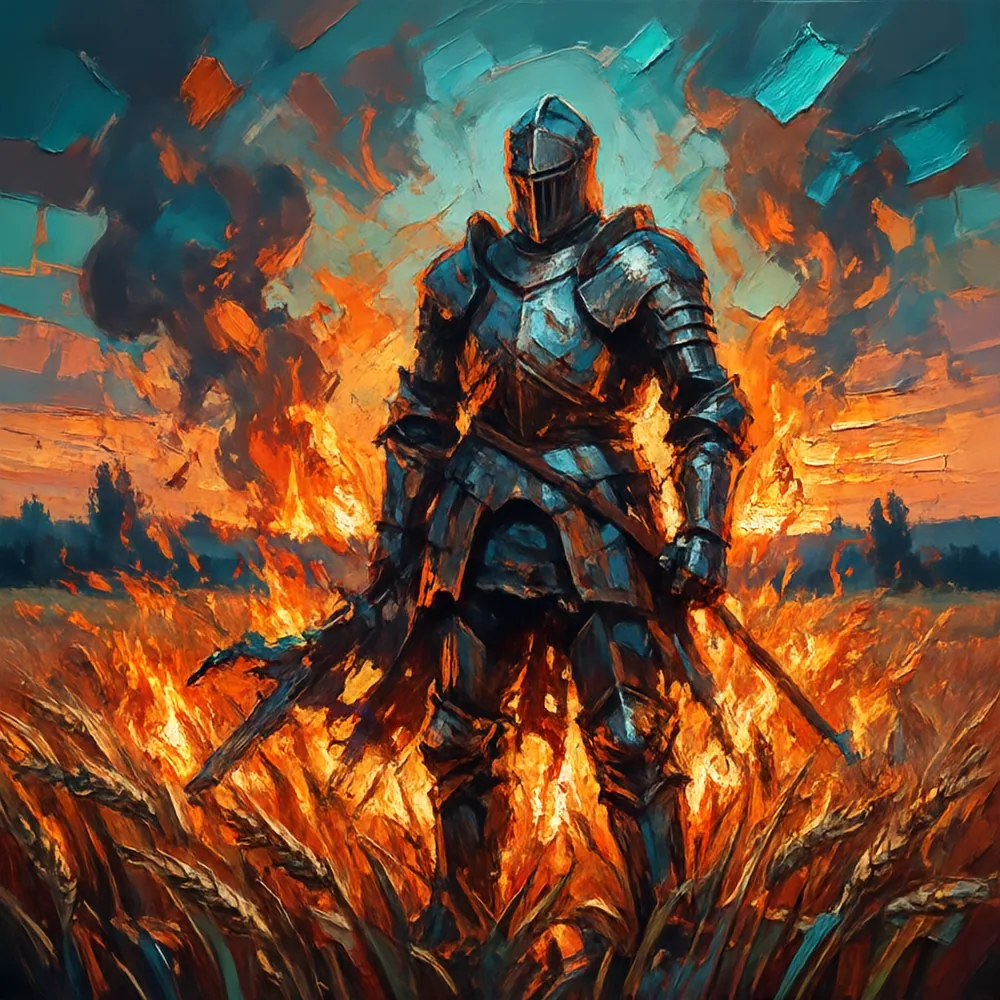
SenseNova U1.6: Impasto concept art

Thick impasto digital painting of a lone knight in weathered armor standing in a burning wheat field at dusk, dramatic rim light, bold visible palette-knife and brush strokes, rich orange and teal palette, painterly concept art.

Impasto concept art

SenseNova U1.6 text rendering: posters that read correctly

Text is where SenseNova U1.6 stands out. In our tests, every word we put in quotation marks came out as written, in English and in Chinese.

SenseNova U1.6 gets dates, numbers and line-ups right

The summit poster asked for a headline, a subtitle, a date line with a venue, three numbered points, a URL and a ticket number. SenseNova U1.6 wrote all of them correctly, including "March 14-16, 2026" and "Ticket No. 2026-0471". The jazz poster kept all three band names and the "No. 047 / 300" stamp.

Prompt

A modern corporate training poster. Huge bold headline text "LEARN, ENGAGE, GROW" at the top. Subtitle "Leadership Summit 2026". Date line "March 14-16, 2026 | Hall B, Austin Convention Center". Three numbered points stacked vertically: "01 Keynote Talks", "02 Hands-on Workshops", "03 Networking Night". Footer text "Register at summit.example.com" and "Ticket No. 2026-0471". Clean navy blue and orange palette, geometric shapes, professional business style.
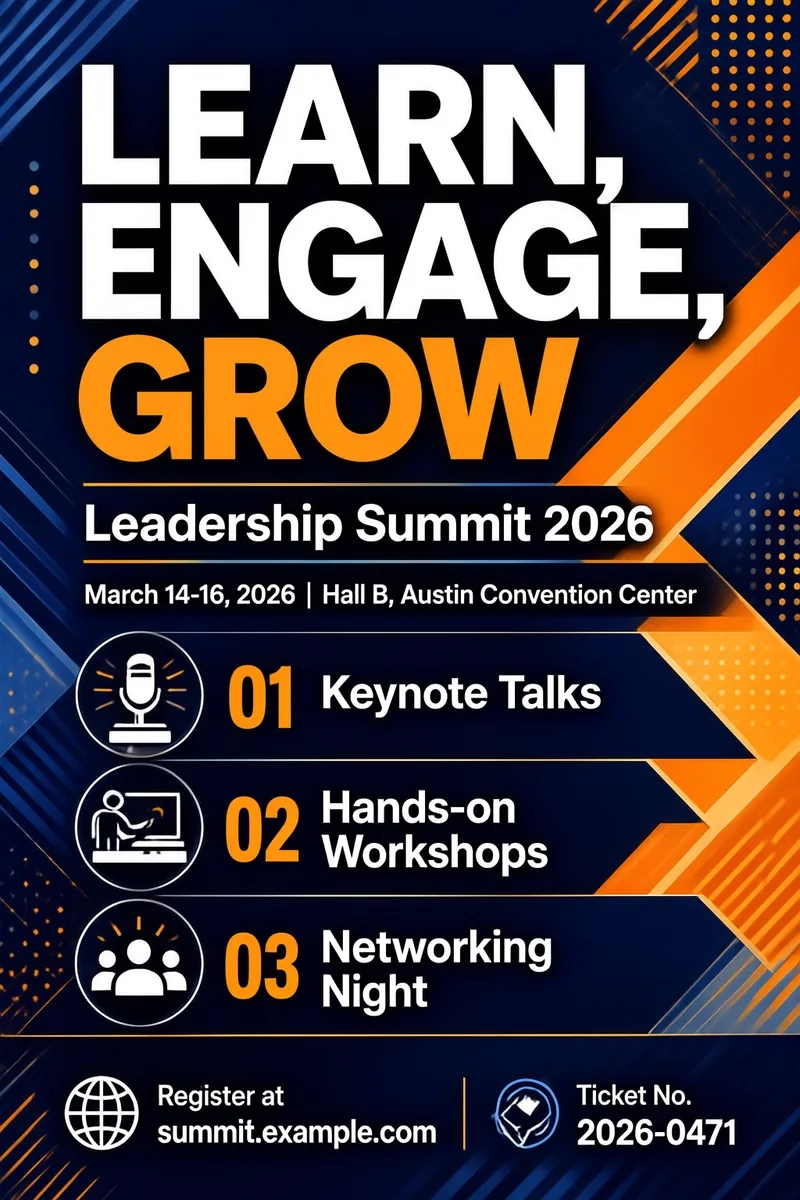
SenseNova U1.6 poster with the headline LEARN, ENGAGE, GROW, a date line, three numbered points and a ticket number, all spelled correctly

Chinese titles and brush lettering in SenseNova U1.6

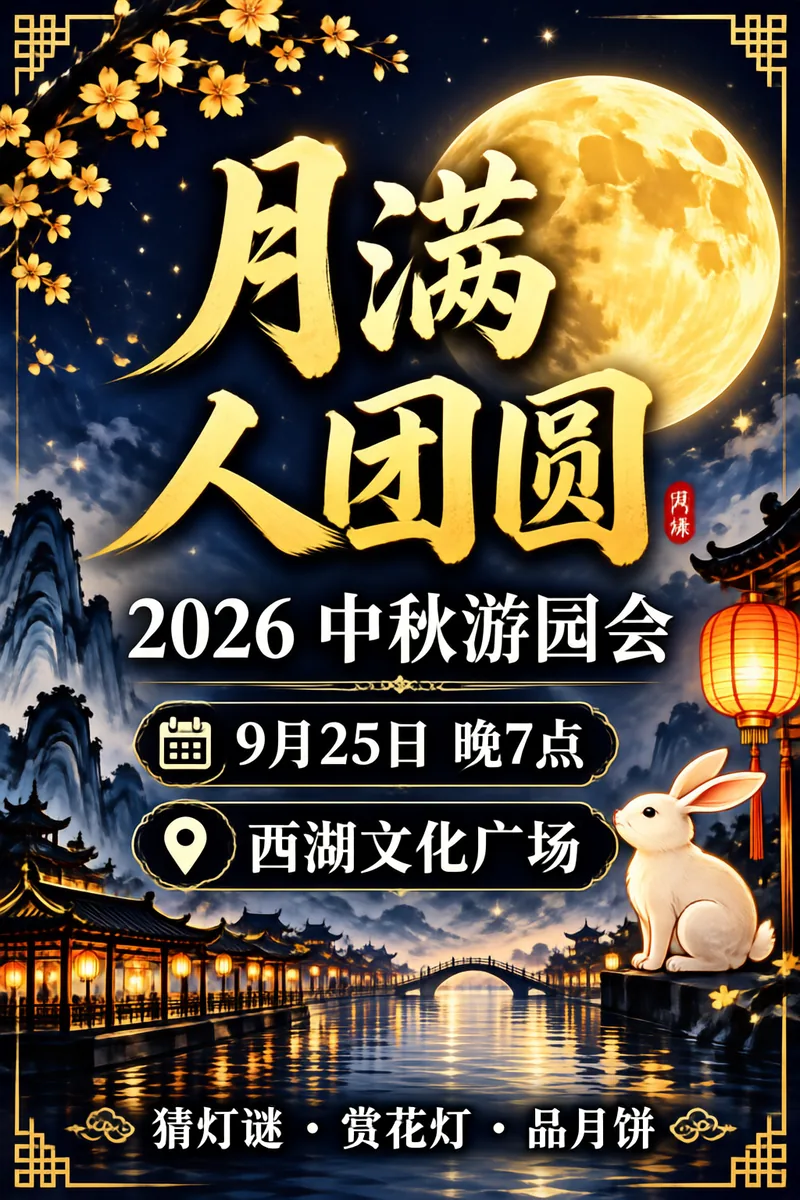
The Mid-Autumn poster has a brush-style title, a subtitle, a date, a venue and a footer line. All five Chinese strings are correct, laid over an ink landscape with a gold moon. That is rare for an open-source model and useful for festival, retail and menu designs.

Prompt

一张中国风中秋节活动海报,主标题“月满人团圆”,副标题“2026 中秋游园会”,日期“9月25日 晚7点”,地点“西湖文化广场”,底部一行小字“猜灯谜 · 赏花灯 · 品月饼”。水墨山水背景,金色点缀,大大的圆月与玉兔,竖版构图。

SenseNova U1.6 Mid-Autumn Festival poster with correct Chinese brush lettering, date and venue over an ink landscape with a full moon

Where SenseNova U1.6 still slips

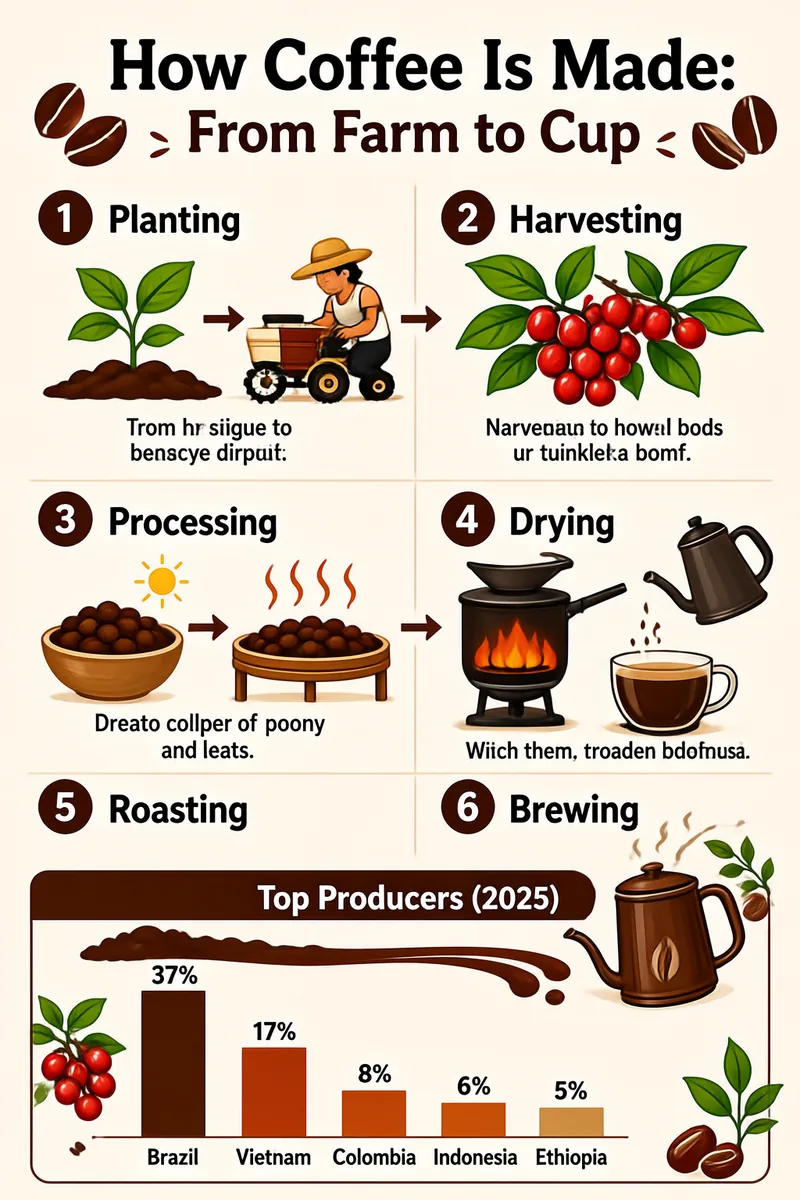
Very small caption text is the weak spot. In dense infographics the headings stay correct, but one-line explanations under each step can turn into nonsense letters, and the model sometimes adds small labels you did not ask for. Keep every word you need in quotes and leave the rest out.

SenseNova U1.6 self-correction: the model checks its own text

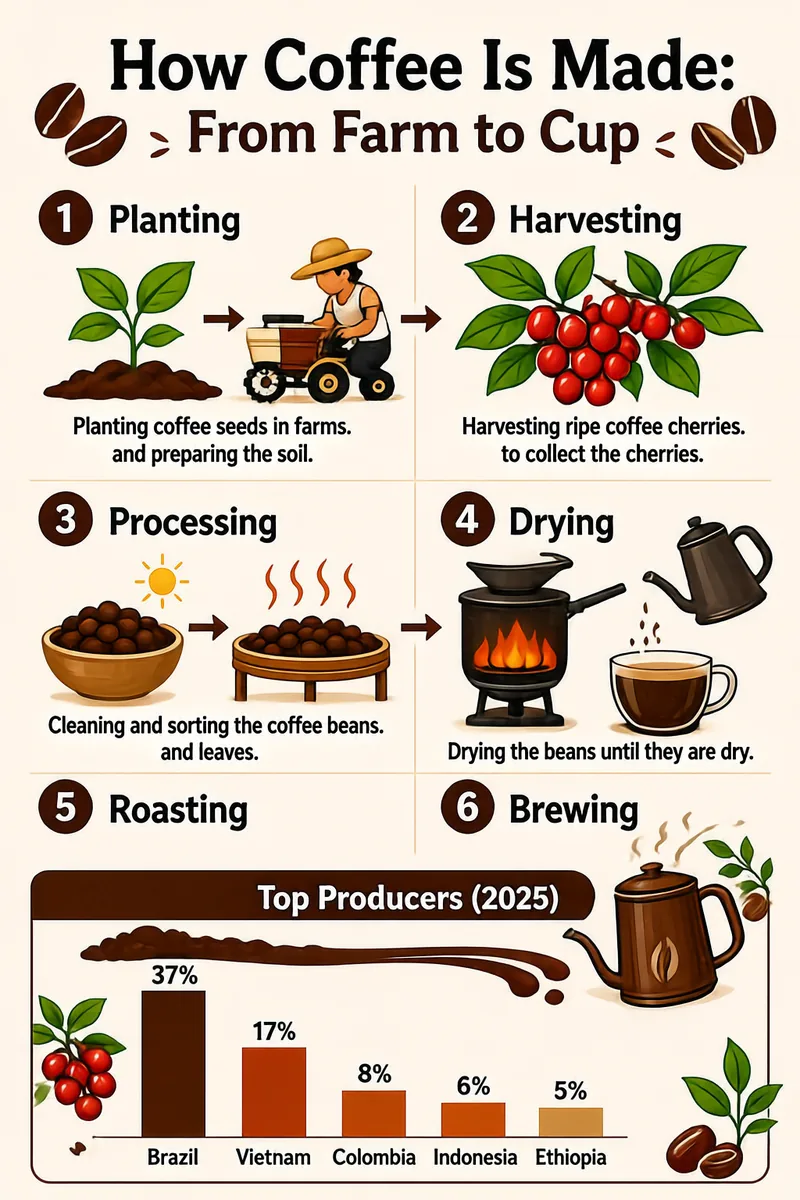
SenseNova U1.6 can review its first draft against the prompt, write down what is wrong and generate a fixed version. It decides on its own whether a fix is needed.

SenseNova U1.6 first draft of a coffee infographic with garbled caption text under each step
First draft
SenseNova U1.6 corrected coffee infographic with readable English captions under the first four steps
After self-correction

In this coffee infographic the first draft had the right title, step names and chart labels, but the sentences under each step were unreadable. After self-correction, the first four captions became plain English, such as "Planting coffee seeds in farms." The last two captions were dropped rather than fixed, so it is not perfect. When no error is found the extra check costs little time; when a fix is triggered, the run takes several times longer. SenseTime reports a 7% average relative gain on dense infographic tasks from this step (SenseTime's own benchmark).

Prompt

A clean vertical infographic titled "How Coffee Is Made: From Farm to Cup". Six numbered steps with icons and short labels: "1 Planting", "2 Harvesting", "3 Processing", "4 Drying", "5 Roasting", "6 Brewing", each with one short sentence of explanation. A bar chart titled "Top Producers (2025)" with bars labeled "Brazil 37%", "Vietnam 17%", "Colombia 8%", "Indonesia 6%", "Ethiopia 5%". Flat illustration style, warm brown palette.

SenseNova U1.6 image editing: change one thing in plain words

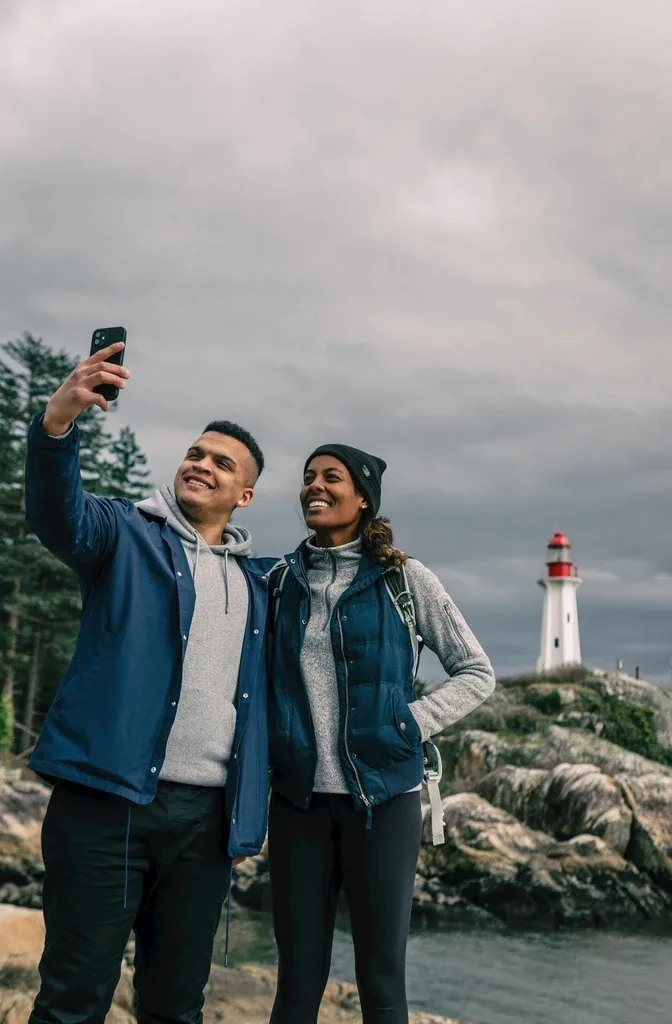
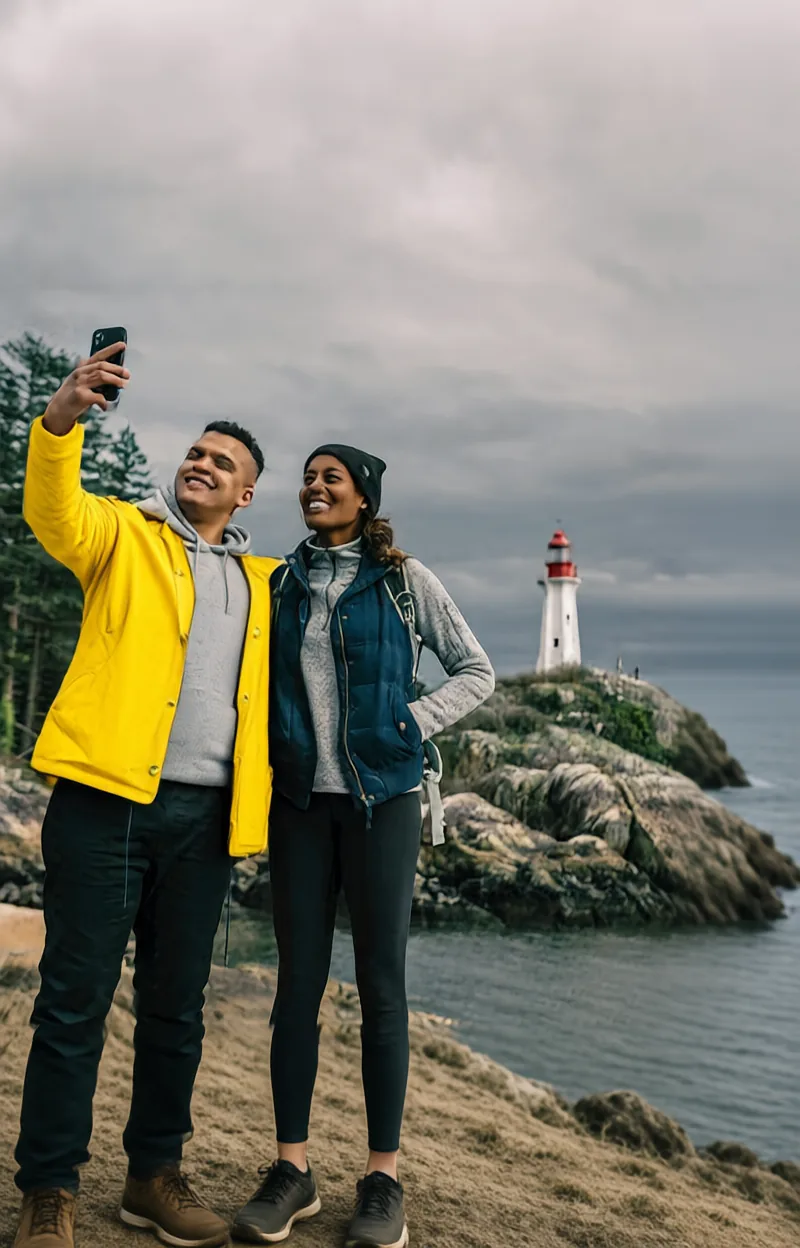
Give SenseNova U1.6 a photo and a short instruction. Local changes and style changes both work without masks.

Original photo of two hikers taking a selfie in front of a lighthouse, the man on the left in a blue jacket
Input
SenseNova U1.6 edit where the man on the left now wears a bright yellow jacket and everything else is unchanged
SenseNova U1.6 output

Change the jacket of the person on the left to bright yellow.

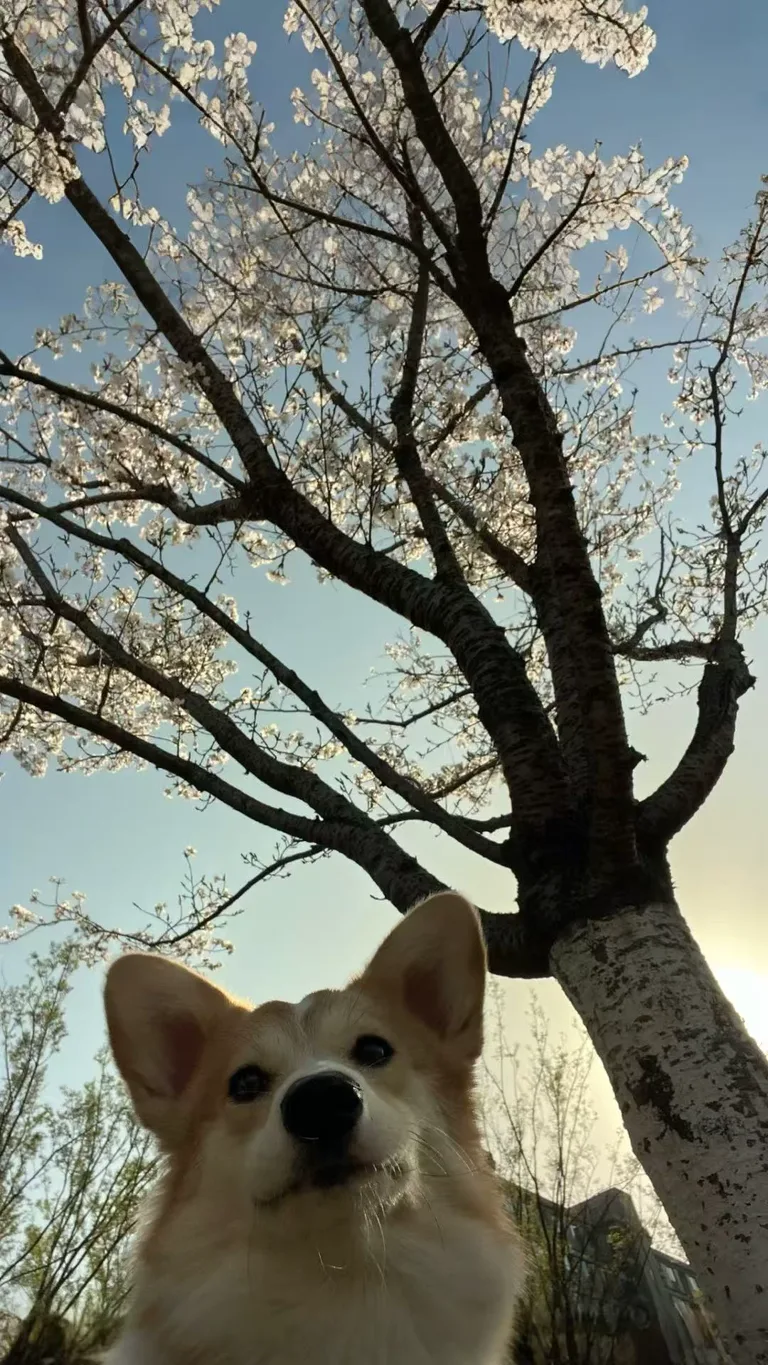
Original photo of a corgi under a blossoming tree against a blue sky
Input
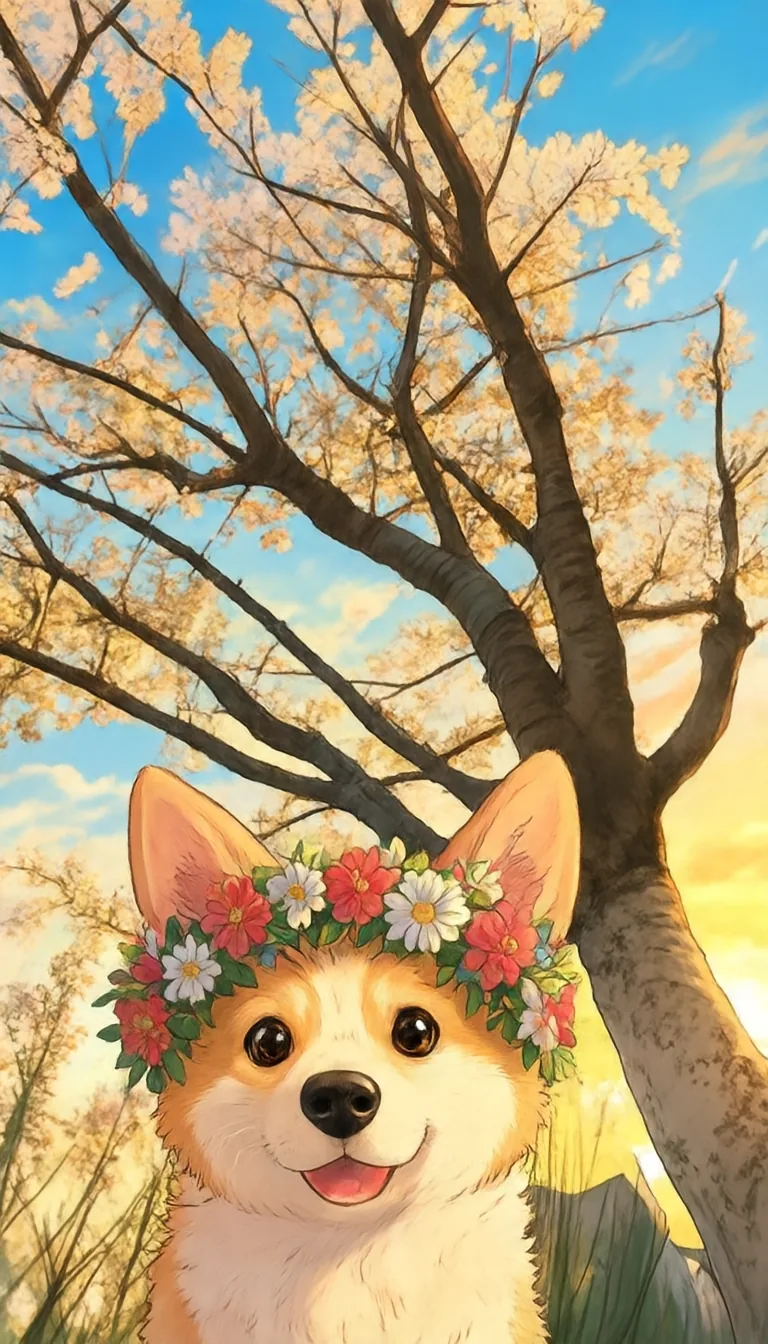
SenseNova U1.6 edit showing the corgi in a hand-painted animation style wearing a flower crown
SenseNova U1.6 output

Put a flower crown on the puppy's head and turn the picture into a Studio Ghibli style.

The jacket edit changed only the jacket: faces, the lighthouse and the sky stayed put. One caution from our tests: asking SenseNova U1.6 to keep a realistic person identical while replacing the whole background tends to redraw the face with a harsh, over-sharpened look. For portraits, small edits work better than full scene swaps.

What is SenseNova U1.6?

SenseNova U1.6 is an image generation and editing model from SenseTime, released as open weights in November 2026. It follows SenseNova U1.5 and keeps the same native unified design: one 8B Mixture-of-Transformers (MoT) model handles both image understanding and pixel generation, without a separate text encoder or VAE.

That design is why SenseNova U1.6 can read its own output and correct it. SenseTime says U1.6 improves overall aesthetic quality by about 10% over U1.5 in user preference tests (SenseTime's own evaluation). The weights, code and LoRAs are under the Apache 2.0 license, so commercial use is allowed as long as you keep the license notice.

SenseNova U1.6 ships with a 4-step and an 8-step distilled LoRA. On a 24 GB NVIDIA L4 in our own test, the 8-step setup produced a 1024×1024 image in about 4 seconds, while the 50-step base model took about 54 seconds with only slightly better detail.

SenseNova U1.6 at a glance

Developer
SenseTime
Released
November 2026
Architecture
8B MoT, unified
License
Apache 2.0
Modes
Text-to-image, editing
Steps
4 / 8 (LoRA) or 50

SenseNova U1.6 vs Nano Banana 2, Seedream 5.5 and FLUX.2 klein

How SenseNova U1.6 differs from other models you may already use. Only publicly documented facts and our own observations are listed.

FeatureSenseNova U1.6Nano Banana 2Seedream 5.5FLUX.2 klein 4B
DeveloperSenseTimeGoogleByteDance SeedBlack Forest Labs
Open weightsYes, Apache 2.0NoNoYes, Apache 2.0
Text in imagesStrong in English and Chinese postersStrongStrong, including small textShort English signs
Image editingYes, from text instructionsYesYes, multi-turnYes
Self-correctionBuilt inNot advertisedNot advertisedNot advertised

Pick SenseNova U1.6 when you need an open-source model you can run yourself, or when the job is a poster, flyer or banner with exact English or Chinese words. For quick everyday images, Nano Banana 2 and Seedream 5.5 are also available on nanobananana.

How to use SenseNova U1.6

Run SenseNova U1.6 on your own GPU, or try it right away in the nanobananana generator.

  1. 1

    Update ComfyUI

    SenseNova U1.6 needs ComfyUI 0.46.0 or newer. The official templates are "SenseNova U1.6: Text to Image" and "SenseNova U1.6: Image Edit".

  2. 2

    Download the weights

    Get the SenseNova U1.6 checkpoint (BF16 about 35 GB, INT8 about 18 GB) and the 8-step LoRA from Hugging Face. Plan for a 24 GB GPU; the full model stays around 18 GB of VRAM in FP8.

  3. 3

    Write the prompt and generate

    Put every word that should appear in the image inside quotes, choose a ratio between 1:3 and 3:1, and use 8 steps with CFG 1.0 for the LoRA (50 steps and CFG 4.0 without it).

Prefer not to install anything? Use the SenseNova U1.6 generator at the top of this page.

SenseNova U1.6 prompt tips

What worked best in our SenseNova U1.6 tests.

  • Quote every word

    Write the exact headline, date, price and address in quotation marks. Text you do not spell out may be invented.

  • Describe the layout

    Say where things go: "large title at the top", "three numbered points stacked vertically", "footer text".

  • Name the film or lens

    For portraits, film stocks and lenses such as "Kodak Portra 400, 85mm" push the output toward natural skin and grain.

  • Skip tiny captions

    Long sentences in small type are the most likely to garble. Keep infographic captions short or leave them out.

  • Use higher resolution for posters

    Text-heavy posters look cleaner at 2K-class sizes than at 1 megapixel.

  • Edit small, not everything

    One clear change per instruction gives the most faithful edit, especially on photos of people.

SenseNova U1.6 FAQ

Is SenseNova U1.6 free?

The SenseNova U1.6 weights are free to download and run on your own hardware under Apache 2.0. On nanobananana, the credit cost of each generation is shown on the generate button before you create anything.

Can I use SenseNova U1.6 images commercially?

Yes. SenseNova U1.6 is released under Apache 2.0, which allows commercial use and modification as long as you keep the license and copyright notice. You are still responsible for what you generate, such as trademarks or real people in the image.

Can I try SenseNova U1.6 online without a GPU?

Yes. Use the generator at the top of this page: type a prompt or pick one from the examples, choose a ratio and generate in your browser. Nothing needs to be installed.

Which aspect ratios and resolutions does SenseNova U1.6 support?

SenseNova U1.6 accepts aspect ratios from 1:3 to 3:1, with width and height in multiples of 32. It was trained at 2048×2048, and the official default is about 4 megapixels. It also works at 1 megapixel with a little less detail. The ratios and sizes available here are listed in the generator menus.

How is SenseNova U1.6 different from Nano Banana and Seedream?

Nano Banana and Seedream are closed models you use through an app or API. SenseNova U1.6 is open-source, so you can run and fine-tune it yourself, and it adds a self-correction step that checks text in its own output. All three render text well; SenseNova U1.6 is especially accurate on English and Chinese poster text.

How does SenseNova U1.6 compare with FLUX?

FLUX.2 klein 4B is also Apache 2.0 and very fast, but in our tests it cannot write Chinese and handles only short English text. SenseNova U1.6 is larger, needs about 18 GB of VRAM instead of about 13 GB, and is much better at multi-line, bilingual typography.

What GPU do I need to run SenseNova U1.6 locally?

A 24 GB card is the practical minimum for the full model. In our test the FP8 model with the 8-step LoRA used about 18–19 GB for a 1024×1024 image and up to about 22 GB when self-correction ran. SenseTime's offloading mode can fit in less VRAM but needs about 64 GB of system RAM and runs slower.

What are the known weaknesses of SenseNova U1.6?

Small explanation text in dense infographics can come out garbled, the model may add small labels you did not request, and replacing the background of a realistic portrait can over-sharpen the face. Self-correction helps with English text but only partly fixes Chinese captions.

Try SenseNova U1.6 prompts now

Pick a prompt from this page or write your own, and generate in the SenseNova U1.6 generator above.

Go to the generator

Also Try

Nano Banana
Google

Nano Banana

Generate stunning AI images with Nano Banana. Fast, versatile, and free to start. Create beautiful artwork, photos, and designs with text prompts.

Nano Banana Pro
Google

Nano Banana Pro

Professional AI image generation with Nano Banana Pro. Higher resolution, better detail, and advanced features for professional creators.

Nano Banana 2
Google

Nano Banana 2

The latest Nano Banana 2 model. More affordable, supports up to 10 reference images, and delivers excellent quality at lower cost.

Z Image
Tongyi

Z Image

Fast and affordable AI image generation with Z Image. Text-only generation at just 4 credits per image. Perfect for quick iterations.

GPT Image 2
OpenAI

GPT Image 2

GPT Image 2 is OpenAI's next-gen image model for in-image text rendering, pixel-level editing, and world-knowledge-driven realism. Supports text-to-image and image-to-image with up to 16 reference images.

GPT Image 2.5
OpenAI

GPT Image 2.5

GPT Image 2.5 is OpenAI's newest image model, released September 8, 2026. Generate and edit images online with GPT Image 2.5 Flare for speed or GPT Image 2.5 Sunburst for precision: sharper detail, faithful reference photos, targeted edits that leave the rest untouched, and 1K / 2K / 4K output with up to 16 reference images.

GPT Image 2.6
OpenAI

GPT Image 2.6

GPT Image 2.6 is OpenAI's November 2026 image model with Flare and Sunburst tiers, complexity control, markup edits, SVG and GIF output. Compare the tiers, check pricing, and start creating.

Seedream 5.5
ByteDance

Seedream 5.5

Try Seedream 5.5, ByteDance's newest image model, online. See its stable multi-turn editing, native transparent PNG output, realistic photos and sharp small text, then start creating.

Share this page