SenseNova U1.6: What It Is and How to Use It on Nano Banana
Nano Banana Team
Updated Nov 27, 20267 min read
Summary
SenseNova U1.6 is SenseTime's newest open-weight image model, and its strongest skill is writing the exact words you put in quotation marks, in English and in Chinese. On Nano Banana you can run it in the browser for 1 credit per image, at 1K or 2K, with an optional reference photo for edits.
TL;DR
- Designers who need readable posters: use this model for titles, dates, prices and line-ups, because in our tests every quoted word came out exactly as written.
- Shops and marketers on a budget: try it for product shots and labels, because it costs 1 credit per image on Nano Banana at both 1K and 2K.
- Anyone editing a photo: upload one reference image and describe a single change, because the model keeps the rest of the picture stable for small edits.
- People who want the newest photoreal model: compare it with Nano Banana 2 or Seedream 5.5, because those hosted models remain stronger all-rounders for complex scenes.
On this page
- What is SenseNova U1.6?
- Which images does it handle best?
- How does self-correction work?
- Can the model edit photos?
- How do you use SenseNova U1.6 on Nano Banana?
- How much does it cost on Nano Banana?
- How does SenseNova U1.6 compare with other models on Nano Banana?
- What are its limits?
- Prompt tips for better text
- Frequently asked questions

What is SenseNova U1.6?
SenseNova U1.6 is an image model from SenseTime, the Chinese AI company behind the SenseNova model family. It was released with open weights in late November 2026 and follows SenseNova U1.5. Like U1.5, SenseNova U1.6 is a single 8B Mixture-of-Transformers (MoT) model that handles both image understanding and pixel generation in one network.
That unified design matters in practice. Because the same model can read an image as well as draw one, it can look at its own first draft, compare it with your prompt and produce a corrected version. SenseTime calls this native self-correction. According to the official model card(opens in a new tab), the new version also improves overall aesthetic quality by about 10% over U1.5 in user preference tests, and self-correction gives a 7% average relative gain on dense infographic tasks. Both numbers come from SenseTime's own evaluations, and the ComfyUI tutorial(opens in a new tab) repeats them.
The weights ship as a 50-step base model plus a distilled 8-step LoRA for fast generation. Nano Banana runs the fast 8-step version of SenseNova U1.6 on our own GPU, which is why a 1K image usually finishes in a few seconds.
Which images does it handle best?
Text is where this model stands out. Most image models can draw a nice poster, but they misspell the headline, scramble the date or invent letters in the small print. In our own tests, it wrote every word we put in quotation marks exactly as written: headlines, subtitles, dates, numbered points, URLs and ticket numbers.
Here is a business poster from our test run. The prompt asks for a headline, a subtitle, a date line with a venue, three numbered points, a URL and a ticket number, and the model got all of them right.
 SenseNova U1.6 · 2:3
A modern corporate training poster. Huge bold headline text "LEARN, ENGAGE, GROW" at the top. Subtitle "Leadership Summit 2026". Date line "March 14-16, 2026 | Hall B, Austin Convention Center". Three numbered points stacked vertically: "01 Keynote Talks", "02 Hands-on Workshops", "03 Networking Night". Footer text "Register at summit.example.com" and "Ticket No. 2026-0471". Clean navy blue and orange palette, geometric shapes, professional business style.
Chinese text is just as reliable. The Mid-Autumn Festival poster below has a brush-style title, a subtitle, a date, a venue and a footer line, and all five Chinese strings are correct. That is rare for an image model and useful for festival, retail and menu designs aimed at Chinese-speaking customers.
 SenseNova U1.6 · 2:3
一张中国风中秋节活动海报,主标题“月满人团圆”,副标题“2026 中秋游园会”,日期“9月25日 晚7点”,地点“西湖文化广场”,底部一行小字“猜灯谜 · 赏花灯 · 品月饼”。水墨山水背景,金色点缀,大大的圆月与玉兔,竖版构图。
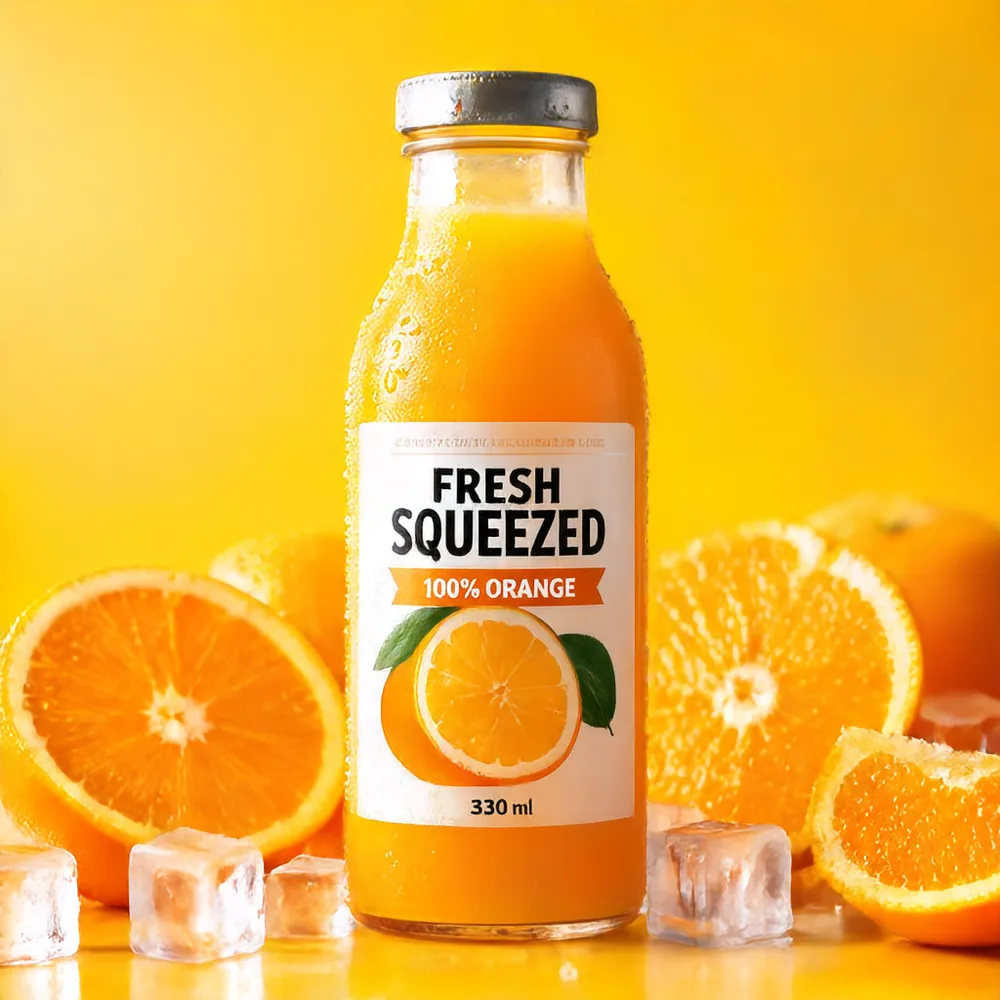
Beyond posters, it is good at product photos with labels and at film-style portraits. Materials, reflections and water droplets look real, and short label text such as "FRESH SQUEEZED" and "330 ml" stays readable. Illustration styles work too, but they are not its main strength.
How does self-correction work?
When self-correction is on, the model first produces a draft, then checks it against your prompt. If it finds a mistake, it writes down what is wrong and draws a fixed version. The model decides on its own whether a fix is needed, and it is meant for text-heavy images such as infographics and step diagrams.
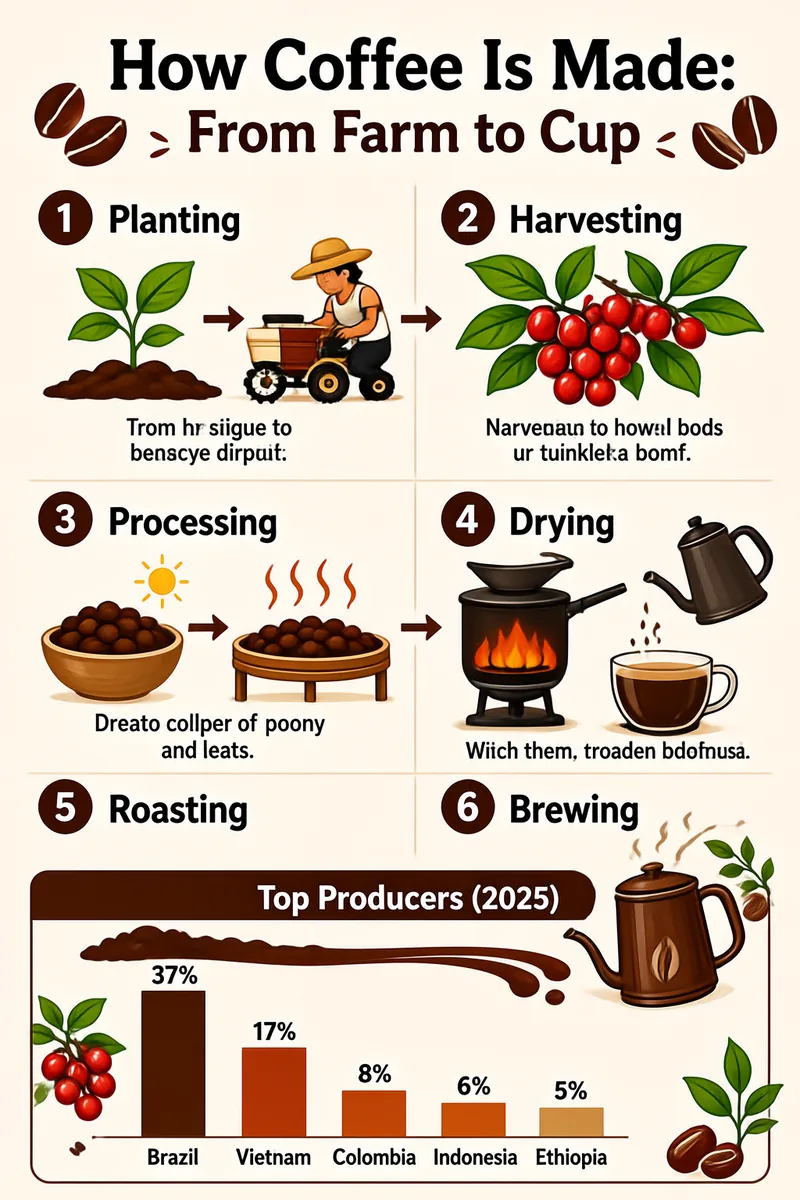
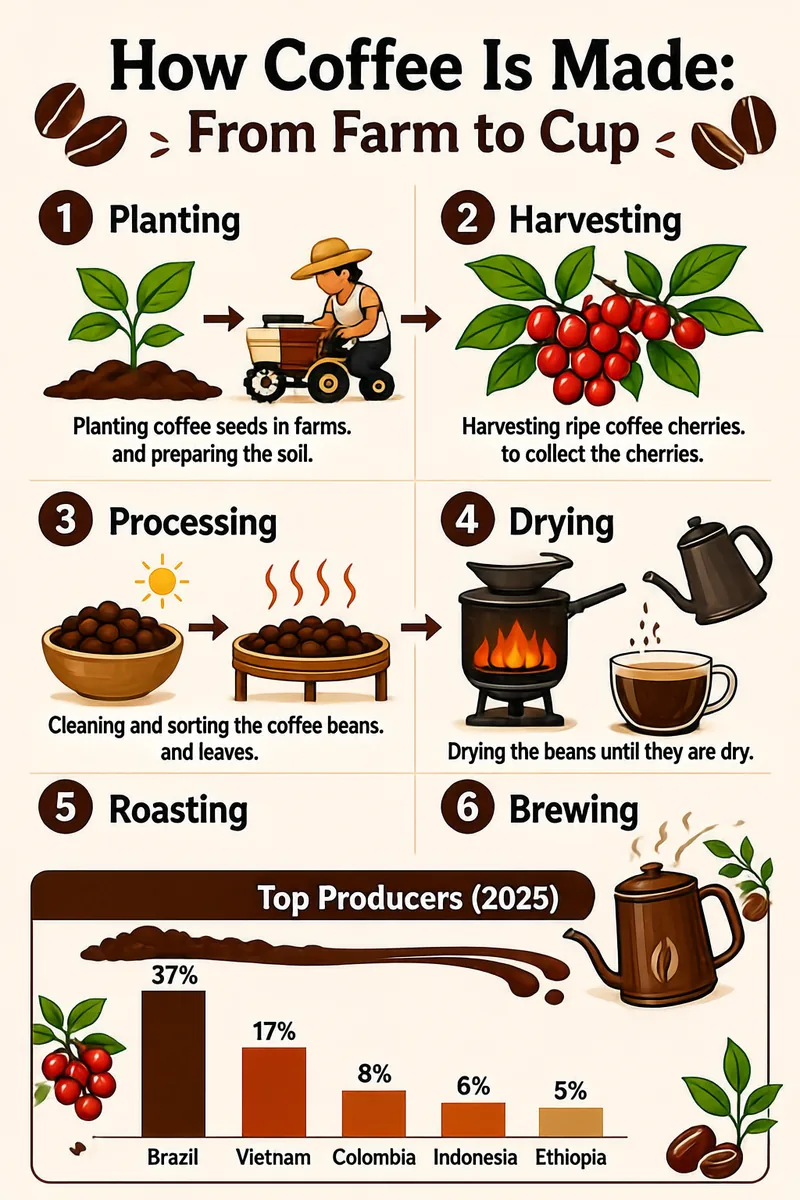
In the coffee infographic below, the first draft had the right title, step names and chart labels, but the sentences under each step were unreadable. After self-correction, the first four captions became plain English. The last two captions were dropped rather than fixed, so it is not perfect, and a run that triggers a fix takes many times longer than a normal one.
 First draft
 After self-correction
A clean vertical infographic titled "How Coffee Is Made: From Farm to Cup". Six numbered steps with icons and short labels: "1 Planting", "2 Harvesting", "3 Processing", "4 Drying", "5 Roasting", "6 Brewing", each with one short sentence of explanation. A bar chart titled "Top Producers (2025)" with bars labeled "Brazil 37%", "Vietnam 17%", "Colombia 8%", "Indonesia 6%", "Ethiopia 5%". Flat illustration style, warm brown palette.
On Nano Banana we run SenseNova U1.6 without the self-correction pass to keep every image fast and predictable. If you need it, run the open weights locally with the official ComfyUI workflow.
Can the model edit photos?
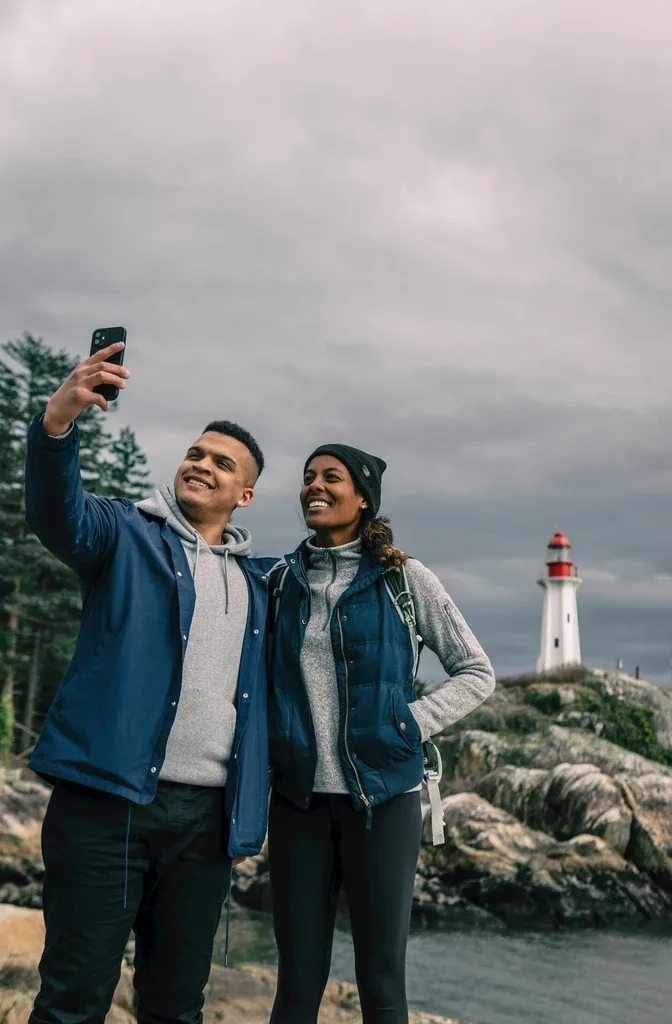
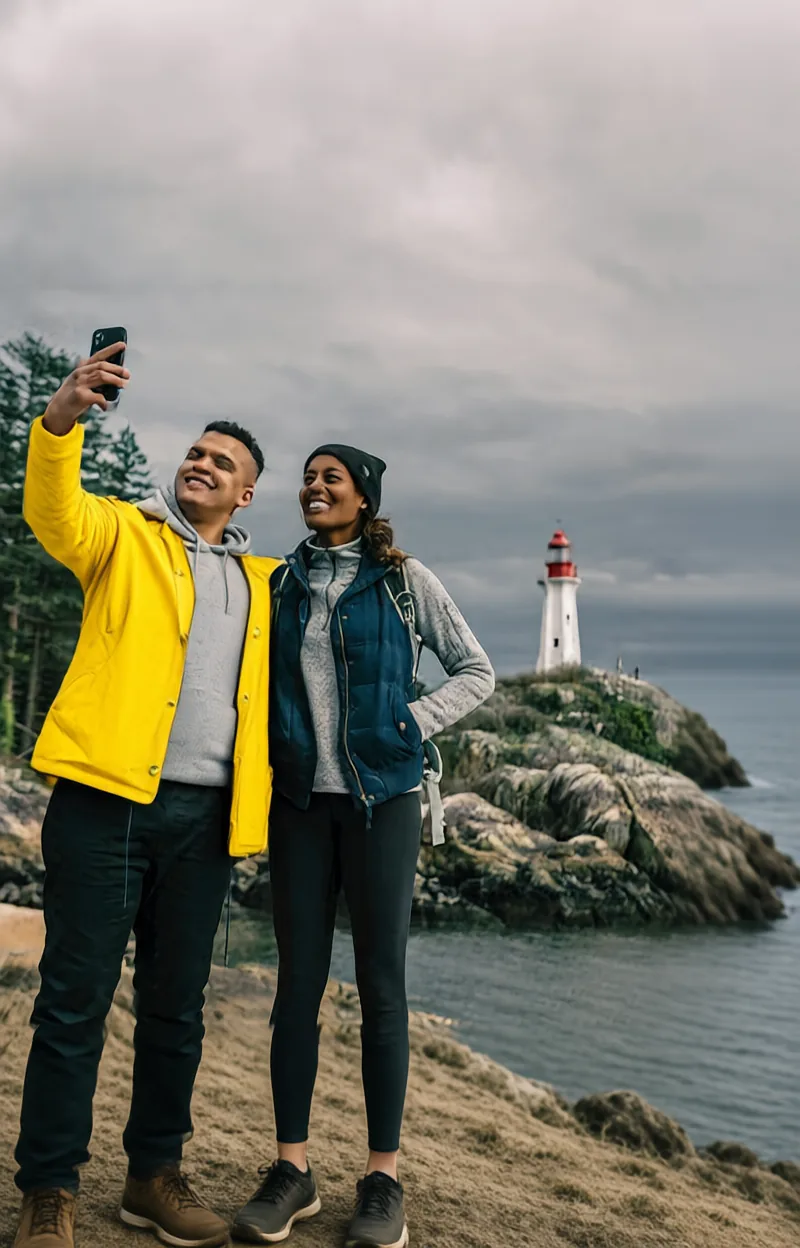
Yes. Give it a photo and a short instruction, and it changes only what you asked for. In the example below we asked it to make the jacket of the person on the left bright yellow. Faces, the lighthouse and the sky stayed the same.
 Input
 SenseNova U1.6 output
Change the jacket of the person on the left to bright yellow.
One caution from our tests: when you ask the model to keep a realistic person identical while replacing the whole background, it tends to redraw the face with a harsh, over-sharpened look. For portraits, small edits work better than full scene swaps.
How do you use SenseNova U1.6 on Nano Banana?
You do not need a GPU or any setup. Open the SenseNova U1.6 generator on Nano Banana and follow these steps:
- Write your prompt in the box. Put every word that must appear in the image inside quotation marks.
- Pick an aspect ratio. There are 15 ratios on Nano Banana, from 1:1, 4:3, 3:2 and 16:9 to 21:9 and 3:1, plus the portrait versions.
- Choose 1K or 2K. 2K takes a little longer but gives finer detail for posters you plan to print.
- Optional: click the plus button and add one reference image to turn the request into an edit.
- Click Generate. The button shows the credit cost before anything runs.
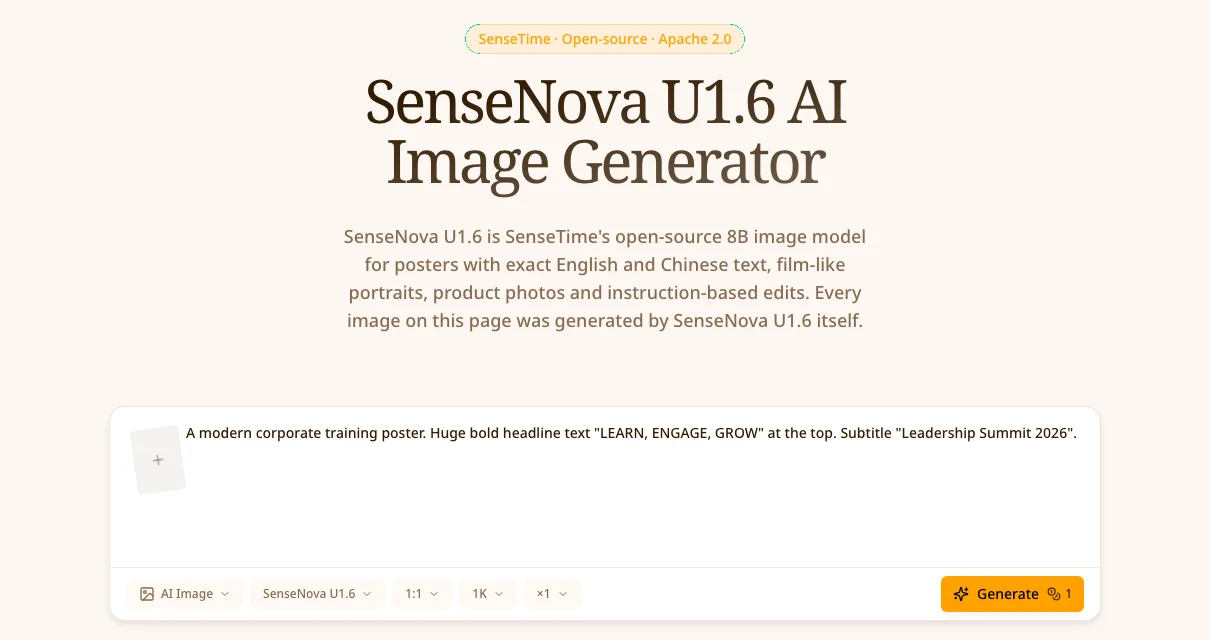
Signed-in users can also pick it from the model menu in the image workspace. Prompts can be up to 2,000 characters long. SenseNova U1.6 runs on our own GPU, so if that machine is busy or under maintenance the generator will tell you the model is temporarily unavailable; try again a little later.
How much does it cost on Nano Banana?
At the time of writing, each SenseNova U1.6 image costs 1 credit, and 1K and 2K cost the same. That makes it one of the cheapest models on Nano Banana; hosted models such as Nano Banana 2 and Seedream 5.5 use more credits per image. SenseNova U1.6 is not one of the unlimited models included in Plus and Ultra plans, so every image is charged. Prices can change, so check the number on the Generate button before you run a batch.
How does SenseNova U1.6 compare with other models on Nano Banana?
| Need | Best pick on Nano Banana |
|---|---|
| Exact English or Chinese text on a poster | SenseNova U1.6 |
| Low-cost product shots with short labels | SenseNova U1.6 |
| General-purpose images and complex scenes | Nano Banana 2 |
| Detailed photoreal commercial images | Seedream 5.5 |
| Fast drafts included in a subscription | Z Image or FLUX.2 klein |
In short, reach for SenseNova U1.6 when the words in the picture matter most. For everything else, the other models on Nano Banana are often a better fit.
What are its limits?
- Very small caption text is the weak spot. In dense infographics the headings stay correct, but one-line explanations can turn into nonsense letters.
- The model sometimes adds small labels you did not ask for. Keep the words you need in quotes and leave the rest out.
- Full background swaps on realistic portraits can over-sharpen faces.
- On Nano Banana, edits accept one reference image.
Prompt tips for better text
- Quote every word that must appear, and keep each text element short.
- Describe the layout in order: headline, subtitle, date line, details, footer.
- Name the language you want the text in when you mix English and Chinese.
- For edits, describe one change per request and say what should stay the same.
Frequently asked questions
What is SenseNova U1.6?
SenseNova U1.6 is an image generation and editing model from SenseTime. It is a single 8B Mixture-of-Transformers model that handles both image understanding and image generation, and it was released with open weights in November 2026.
Is SenseNova U1.6 good at text in images?
Yes. Text rendering is the main reason to pick this model. In our tests it wrote every quoted headline, date, number and venue correctly in both English and Chinese posters, although very small caption text can still come out garbled.
How much does SenseNova U1.6 cost on Nano Banana?
At the time of writing, it costs 1 credit per image on Nano Banana at both 1K and 2K resolution. The Generate button always shows the credit cost before you start, and it is not part of the unlimited models in Plus or Ultra plans.
Can I edit photos with SenseNova U1.6?
Yes. Add one reference image in the Nano Banana generator and describe the change in plain words. Small local edits such as changing a color or adding an object work best; full background swaps on realistic portraits can over-sharpen faces.
Does Nano Banana run SenseNova U1.6 with self-correction?
No. Nano Banana runs a fast 8-step setup without the self-correction pass, so most images finish in seconds. Self-correction is available if you run the open weights yourself, for example in ComfyUI.
Which aspect ratios does SenseNova U1.6 support on Nano Banana?
Fifteen ratios, from square 1:1 through 4:3, 3:2, 16:9 and 21:9 to the extra-wide 3:1, plus the matching portrait versions such as 9:16 and 1:3.
Sources
What changed on this page
- First version, with our own SenseNova U1.6 test images and Nano Banana pricing.